
If you’ve launched a Shopify store, you’re probably excited to start making sales. But here’s something many store owners realize after a few months—simply having a beautiful online store doesn’t guarantee traffic.
Thousands of Shopify stores compete for the same customers every day. The difference between stores that struggle and stores that grow consistently often comes down to one thing: SEO (Search Engine Optimization).
SEO helps your Shopify store appear in Google search results when potential customers search for products you sell. Unlike paid ads, organic traffic continues bringing visitors without paying for every click.
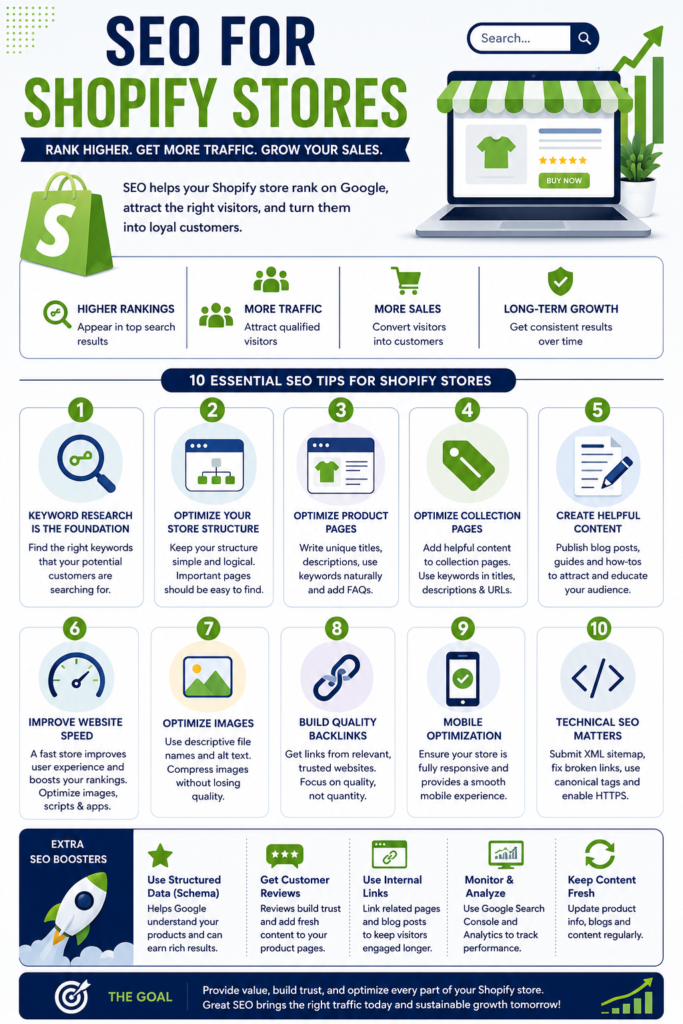
In this guide, you’ll learn practical Shopify SEO strategies that actually work in 2026. Whether you’re just starting or already running a successful store, these tips can help improve your rankings, increase organic traffic, and boost sales.
What is Shopify SEO?
Shopify SEO is the process of optimizing your online store so search engines like Google can understand, index, and rank your pages.
The goal is simple:
- Increase organic traffic
- Rank higher for product-related keywords
- Improve user experience
- Generate more sales without relying entirely on paid advertising
SEO isn’t just about adding keywords. It involves improving your website’s speed, structure, content, technical setup, and authority.
When done correctly, Shopify SEO becomes one of the highest ROI marketing channels.
Why SEO Matters for Shopify Stores
Many new store owners spend most of their budget on Facebook or Google Ads. Ads work—but the moment you stop paying, your traffic disappears.
SEO works differently.
Every optimized page becomes a long-term asset that can attract visitors for months or even years.
Some benefits include:
- Free organic traffic
- Better conversion rates
- Higher customer trust
- Lower customer acquisition cost
- Sustainable business growth
- Improved brand visibility
If your competitors invest in SEO while you don’t, they’ll continue capturing customers searching for your products.
How Google Ranks Shopify Stores
Google evaluates hundreds of ranking factors before deciding which pages deserve top positions.
Some of the most important include:
Content Quality
Google wants pages that genuinely answer user questions.
Instead of writing short product descriptions copied from suppliers, create unique and detailed content.
Explain:
- Features
- Benefits
- Materials
- Use cases
- Size information
- Care instructions
- FAQs
Helpful content always performs better.
Page Experience
Google measures how users interact with your website.
Factors include:
- Fast loading speed
- Mobile responsiveness
- Easy navigation
- Secure HTTPS connection
- Minimal layout shifts
A better experience usually leads to better rankings.
Backlinks
When trusted websites link to your Shopify store, Google sees those links as votes of confidence.
Quality matters much more than quantity.
Start with Proper Keyword Research
Keyword research is the foundation of every successful SEO strategy.
Instead of guessing what customers search for, use tools like:
- Google Keyword Planner
- Ahrefs
- Semrush
- Ubersuggest
- Google Search Console
Look for keywords that have:
- High buying intent
- Decent search volume
- Low to medium competition
For example:
Instead of targeting
Shoes
Target
Women’s white running shoes
Or
Waterproof hiking shoes for men
Long-tail keywords usually convert much better because users know exactly what they want.
Optimize Your Shopify Store Structure
A well-organized website helps both users and search engines.
A simple structure might look like this:
Home
↓
Collections
↓
Product Pages
↓
Blog Articles
↓
Contact & About
Avoid creating too many unnecessary categories.
Every important page should be reachable within three clicks.
Good navigation improves crawling and user experience.
Write SEO-Friendly Product Pages
Product pages are often the biggest opportunity for Shopify stores.
Unfortunately, many stores use manufacturer descriptions copied by hundreds of other websites.
Google rarely rewards duplicate content.
Instead, write original descriptions.
Include:
- Primary keyword naturally
- Product benefits
- Specifications
- Real-life examples
- Customer concerns
- FAQs
- Internal links
Rather than saying:
“This bottle holds 750 ml.”
You could write:
“The 750 ml insulated bottle keeps drinks cold for up to 24 hours, making it ideal for gym sessions, travel, and office use.”
That’s more useful—and Google appreciates useful content.
Optimize Collection Pages
Collection pages are often easier to rank than individual products.
Instead of showing only products, add helpful introductory content.
Example:
If your collection is
Running Shoes
Include:
- Buying guide
- Types of running shoes
- Benefits
- Best uses
- Internal links
A short 200–400 word introduction can significantly improve rankings.
Create Helpful Blog Content
Many Shopify owners ignore blogging.
That’s a huge mistake.
Blogs allow you to target informational searches before customers are ready to buy.
Examples include:
- How to choose the right running shoes
- Best gifts for fitness lovers
- Beginner’s guide to yoga accessories
- Winter fashion trends
- Leather shoe care tips
These articles attract visitors earlier in the buying journey.
Later, you can guide them toward your products through internal links.
Improve Shopify Page Speed
Website speed affects both rankings and conversions.
A slow store causes visitors to leave before making a purchase.
Ways to improve speed:
- Compress images
- Use modern image formats like WebP
- Remove unused apps
- Minify CSS and JavaScript
- Limit third-party scripts
- Choose a lightweight Shopify theme
- Enable browser caching where possible
Even improving loading time by one second can positively impact sales.
Optimize Images for SEO
Images play a huge role in eCommerce SEO.
Every product image should have:
Descriptive File Names
Instead of:
IMG_4589.jpg
Use:
black-running-shoes-men.jpg
Alt Text
Describe the image naturally.
Example:
“Men’s black waterproof running shoes with rubber sole.”
Alt text helps search engines understand your images while improving accessibility.
Don’t Ignore Technical SEO
Technical SEO ensures Google can crawl and index your Shopify store properly.
Important tasks include:
Submit XML Sitemap
Shopify automatically generates a sitemap.
Submit it through Google Search Console.
This helps Google discover your pages faster.
Fix Broken Links
Broken links create a poor user experience.
Regularly audit your website and fix:
- 404 pages
- Missing images
- Redirect chains
- Incorrect URLs
Use Canonical URLs
Shopify automatically creates duplicate URLs for some products through collections.
Canonical tags tell Google which version should be indexed.
Thankfully, Shopify handles much of this automatically, but it’s worth checking if you’ve customized your theme.
Secure Your Website
HTTPS is a confirmed ranking factor.
Fortunately, Shopify includes SSL certificates for all stores.
Internal Linking Strategy
Internal links help Google understand your website structure.
They also keep users browsing longer.
For example:
A blog about hiking backpacks can naturally link to:
- Hiking backpacks collection
- Water bottles
- Camping accessories
- Travel gear
Every important page should receive internal links from relevant content.
Build High-Quality Backlinks
Backlinks remain one of Google’s strongest ranking signals.
Some ethical ways to earn links include:
- Guest blogging
- Publishing original research
- Collaborating with influencers
- Creating useful buying guides
- Digital PR campaigns
- Listing your business in trusted directories
- Getting featured in industry blogs
Avoid buying spammy backlinks.
A few quality links outperform hundreds of low-quality ones.
Optimize for Mobile Users
More than half of eCommerce traffic now comes from smartphones.
Your Shopify store should:
- Load quickly
- Have readable fonts
- Feature large tap targets
- Display clear product images
- Offer easy checkout
- Avoid intrusive pop-ups
Test your store on multiple devices to ensure a seamless experience.
Use Structured Data
Structured data (Schema Markup) helps search engines understand your content.
For Shopify stores, important schema types include:
- Product
- Review
- Price
- Availability
- Breadcrumb
- Organization
- FAQ
Rich results can increase click-through rates by displaying additional information directly in search results.
Monitor SEO Performance
SEO isn’t a one-time task.
Track your progress using:
- Google Search Console
- Google Analytics
- Shopify Analytics
Pay attention to:
- Organic traffic
- Keyword rankings
- Click-through rate (CTR)
- Bounce rate
- Conversion rate
- Indexed pages
Regular analysis helps identify opportunities for improvement.
Common Shopify SEO Mistakes to Avoid
Many store owners unknowingly hurt their rankings.
Avoid these common mistakes:
- Copying manufacturer product descriptions
- Ignoring image optimization
- Using duplicate titles
- Publishing thin content
- Forgetting internal links
- Installing too many apps that slow the website
- Targeting overly competitive keywords
- Neglecting mobile optimization
- Leaving broken links unresolved
- Ignoring Search Console errors
Fixing even a few of these issues can lead to noticeable improvements.
Future of Shopify SEO
SEO continues to evolve with advancements in artificial intelligence and changing search behavior.
To stay competitive:
- Focus on user intent instead of keyword stuffing.
- Create genuinely helpful and original content.
- Optimize for voice and conversational searches.
- Improve Core Web Vitals and overall site performance.
- Build trust through customer reviews and transparent policies.
- Keep your product information fresh and accurate.
Search engines increasingly reward stores that provide the best user experience, not just those with the most keywords.
Final Thoughts
Building a successful Shopify store isn’t only about having great products—it’s also about making sure customers can find them. SEO provides a sustainable way to attract high-intent visitors who are actively searching for what you sell.
By conducting thorough keyword research, optimizing product and collection pages, publishing valuable blog content, improving site speed, strengthening technical SEO, and earning quality backlinks, you create a solid foundation for long-term organic growth.
Remember that SEO is a gradual process, not an overnight solution. Consistent improvements, regular content updates, and a customer-first approach will help your Shopify store gain better visibility in search results and drive more sales over time. Invest in SEO today, and your store can continue benefiting from organic traffic for years to come.
Frequently Asked Questions (FAQs)
1. Is Shopify good for SEO?
Yes. Shopify includes many built-in SEO features such as SSL security, XML sitemaps, mobile-friendly themes, and customizable title tags and meta descriptions. However, you still need to optimize your content and technical setup to achieve the best rankings.
2. How long does Shopify SEO take to show results?
Most stores begin seeing measurable improvements within 3–6 months, depending on competition, content quality, and the consistency of optimization efforts.
3. What’s the most important Shopify SEO ranking factor?
There isn’t a single ranking factor. High-quality content, relevant keywords, page speed, backlinks, mobile usability, and technical SEO all work together to improve rankings.
4. Should I install an SEO app for Shopify?
SEO apps can simplify tasks like meta tag editing, image optimization, and structured data implementation. However, they complement good SEO practices—they don’t replace them.
5. How often should I update my Shopify store for SEO?
Review your SEO performance monthly. Update product descriptions, refresh blog posts, improve internal links, and fix technical issues regularly to keep your store competitive.
6. Do product reviews help SEO?
Yes. Customer reviews add fresh, user-generated content to product pages, increase trust, and can improve search visibility when combined with review schema markup.
7. Can blog posts increase Shopify sales?
Absolutely. Informative blog content attracts visitors during the research phase and can guide them to your products through strategic internal linking, increasing the likelihood of conversions.


Leave a Reply